AgentTracker
AgentTracker is a dependency-free status board for anyone running their own always-on local agents, the kind of scheduled scripts you wire up with launchd or cron to do work for you every day. It reads each agent’s real on-disk state (scheduler status, run logs, output artifacts) and renders a self-contained dark-theme HTML dashboard, so at a glance you can tell which agents ran, which stalled, and which failed.
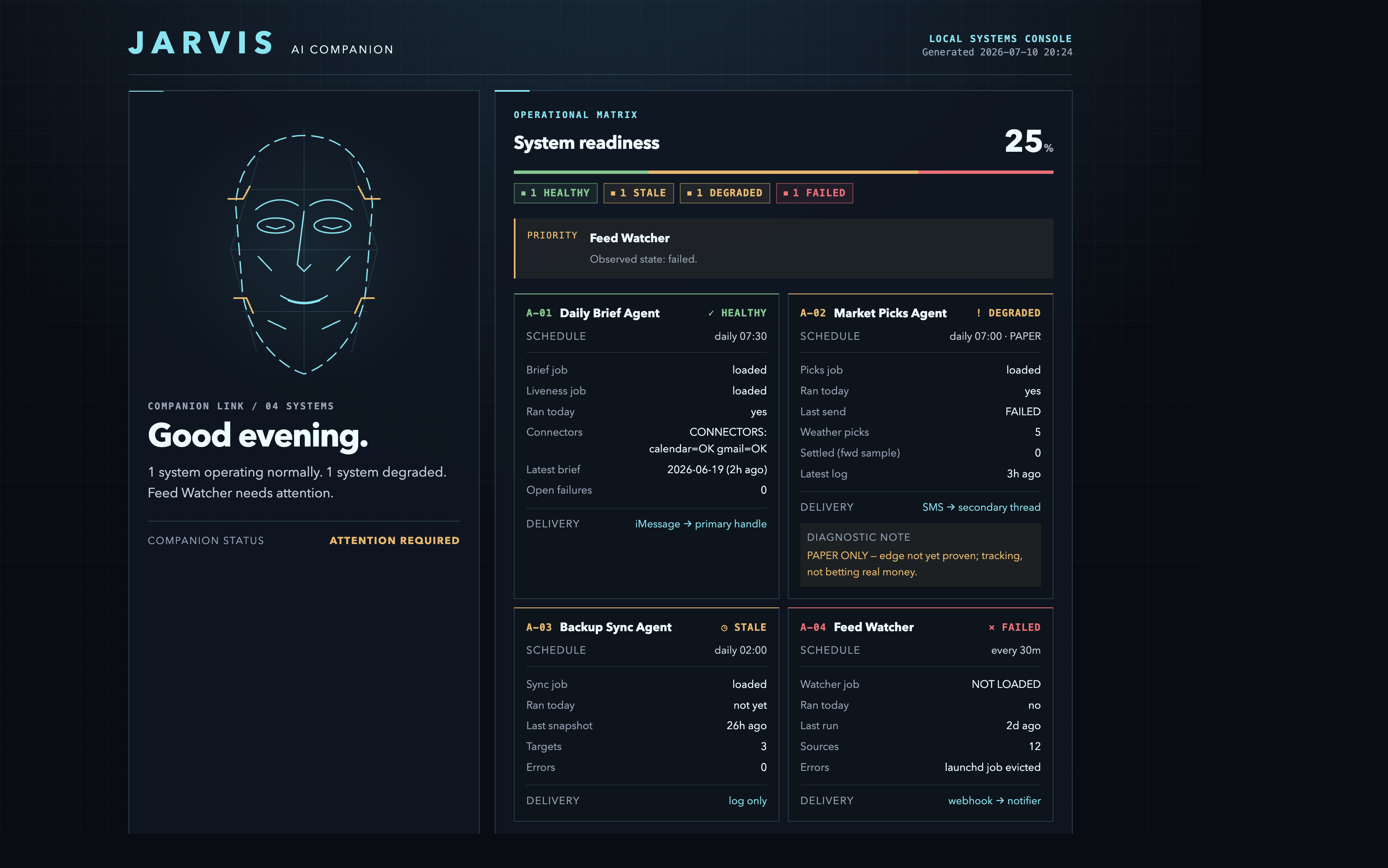
The board is a deterministic view of real signals, not a generative model. It is read-only: no servers, no frameworks, no network calls, no mutation, just Python stdlib and a single HTML file you open in a browser. The companion face and one-line summary are a friendly presentation of those same on-disk signals.
The screenshot and committed
demo.htmlare--demorenders made from fabricated sample data. Your liveindex.htmlnever leaves your machine.
Why
Background agents fail silently. A cron job that stops firing, a delivery step that no-ops, a connector that goes blind — you don’t notice until you needed the output. AgentTracker turns “I hope my agents ran” into a glanceable status board, with honest states derived from ground truth rather than hardcoded green checkmarks.
What it shows
- Per-agent status cards —
HEALTHY/STALE/DEGRADED/FAILED, each derived from real signals (is the scheduled job loaded? did it run today? did delivery succeed?). - Key facts per agent — last run, freshness, output counts, delivery channel.
- Merged activity timeline — recent runs across all agents in one feed.
- Auto-refresh every 5 minutes.
Status model
| State | Meaning |
|---|---|
HEALTHY |
Scheduled job loaded and a clean run recorded today |
STALE |
Job loaded but no run yet today (e.g. before its fire time) |
DEGRADED |
Ran today but a downstream step (delivery/connector) failed |
FAILED |
Job not loaded, or today’s run errored / produced nothing |
Usage
python3 gen-dashboard.py && open index.html      # render from YOUR agents' real state
python3 gen-dashboard.py --demo --out=demo.html  # render a sample board with fake data
📺 See it without installing anything: open demo.html (raw HTML, sample data) — or view it rendered via htmlpreview.
The generator (gen-dashboard.py) is the whole tool. It ships wired to two example agents (a daily-brief job and a second scheduled job) by reading their launchd labels, run-logs, and output files. Adapt the *_state() functions to point at your own agents’ logs and artifacts. The committed demo.html is generated with --demo (fabricated data) so the live view never exposes real machine state.
Architecture
Your local agents (launchd/cron jobs) leave real state on disk — launchctl status, run logs, output artifacts. The generator reads that state (Python stdlib, no network, no mutation), maps it to an honest status model, and renders a self-contained HTML board.
🖼️ View / edit the diagram: drag assets/architecture.excalidraw onto excalidraw.com, or open the live version.
local agents ──▶ on-disk state ──reads──▶ gen-dashboard.py ──▶ index.html (live, git-ignored)
(launchd/cron)   (launchctl,            (status model +        demo.html  (sample, public)
                  logs, artifacts)       HTML render)          + runs at login, refresh 5m
Design principles
- Ground truth, not assumptions. Every field traces to a file or a
launchctlline. The dashboard’s job is to surface real failures, not to look reassuring. - Zero dependencies. Python stdlib only; the output is one portable HTML file.
- Read-only. It never mutates agent state — it only observes.
License
MIT